Under Customer area → Invoices you find all invoices as PDF – available for download at any time, including earlier years. Below them are your payments with the matching invoice.
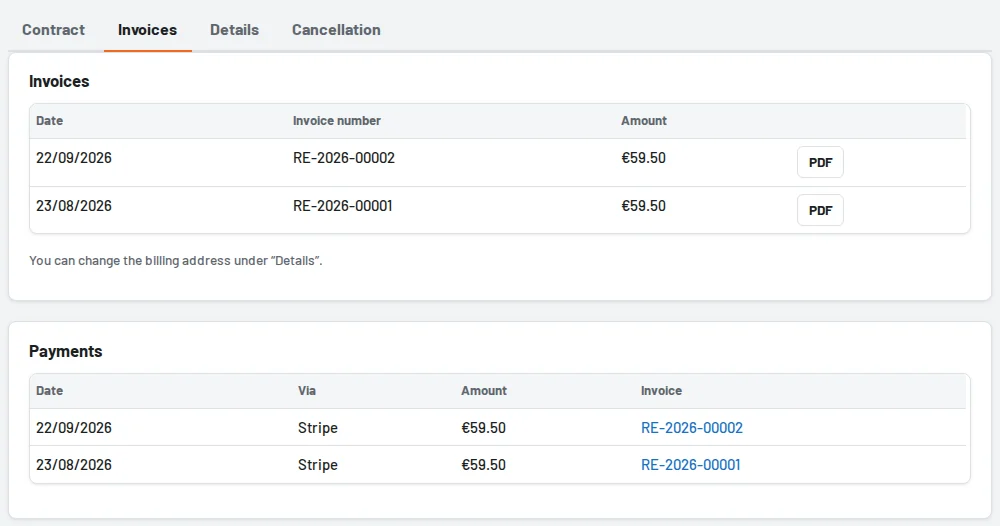
- New invoice: after a payment Tulz creates the invoice and announces it by notification and email to the administrators and to the address for invoices.
- Refund: if a payment is refunded, a credit note is created; it also appears in the list.
- Through a partner: your invoices are issued by the partner; whatever they upload is also shown here. For orders in a shop the invoice comes by email from the shop.
- Trial: there are no costs – so there are no invoices either.
Billing address and contact person
Under Customer area → Details you enter company, addition (e.g. "attn. accounting"), street, postcode, city, country and your VAT ID. The address applies to all future invoices; invoices already issued remain unchanged.
Next to it you set the contact person and the email address for contract and invoices – for example accounting. Invoices, confirmations and contract notices go there, in addition to the administrators. The business name, logo and labels are still set under Settings.