Cancel under Customer area → Cancellation – no letter, no phone call. The contract is cancelled as of the end of the paid term; until then you use Tulz as usual.
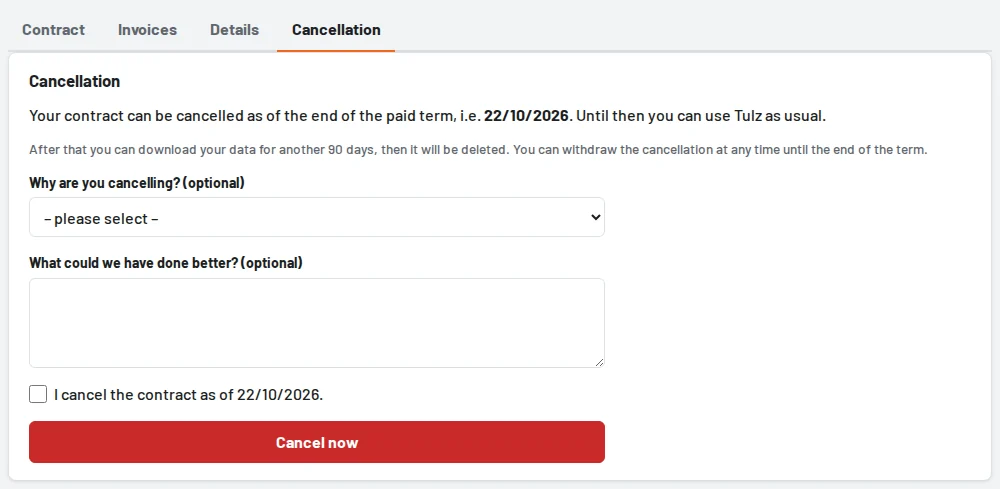
- Optionally choose a reason and tell us what we could do better.
- Tick "I cancel the contract as of …".
- Cancel now – you receive a confirmation by email, and the notice "cancelled" appears at the top.
Withdrawing: until the end of the term, Withdraw cancellation (in the customer area under Contract or Cancellation) is enough – the contract then continues unchanged.
After the end of the term access is locked. You can still download your data for a while (Settings → Download all data (ZIP); the period is shown on the Cancellation page), after that it is deleted.
- Trial: ends automatically, no cancellation is needed.
- One-time licence: does not expire. If you no longer want to use Tulz and want your data deleted, write to us under Contract → Request a change.
- Through a partner: the cancellation goes to your partner, who confirms it.
- Ordered in a shop: the subscription in the shop ends at the end of the term – usually automatically right away, otherwise we take care of it.