Many mechanics have their own tool trolley with a basic set – torque wrench, socket set, calliper. With the personal tool kit, these tools are assigned to the employee permanently, with a signed receipt and a regular confirmation that everything is still there.
A personal kit is not a normal loan: it has no due date, never becomes overdue, does not count towards the maximum number of loans and does not appear in the end-of-day reminder. In the loans list and the booking calendar it is marked Personal kit.
Issuing (tool crib, foremen, administrators)
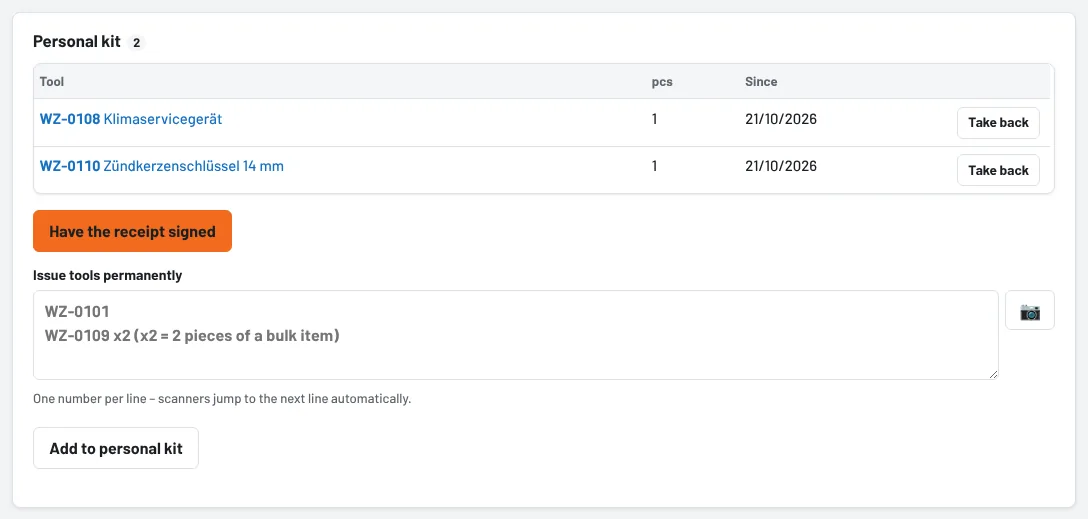
- Administration → Users, open the employee and click Set up (or View and edit) in the Personal kit section.
- Under Issue tools permanently, enter or scan the inventory numbers – one per line. For bulk items add the quantity: "WZ-0109 x2".
- Add to personal kit.
- Have the receipt signed: the employee sees the list and signs on the tablet or phone with a finger. Save receipt.
The receipt can be viewed and printed at any time under Receipts and confirmations – with the list, date and signature. If a tool is reserved for someone else, Tulz only issues it permanently once the reservation has been sorted out.
Taking tools back
If a tool leaves the personal kit, tap Take back in the list – this books the return as usual, with the condition if required. When an employee leaves, the personal kit appears in the leaver check among the open loans. Hand over and Extend do not apply to a personal kit – if a colleague is to have the tool permanently, take it back and issue it to them again.
Regular confirmation
Under Settings → Reminders → Personal tool kit you set how often the employee confirms: every 6, 12 or 24 months, or not regularly.
When the confirmation is due, the employee gets the notification Please confirm your personal kit; My day shows the My personal kit section with Confirm now:
- Tick what is still there.
- Leave anything missing unticked – with a note if you like ("in Max's trolley").
- Sign and Confirm.
If something is missing, the tool crib and foremen immediately get the notification Personal kit: tool missing with the list. The tool stays assigned to the employee until it is cleared up – found, reported lost or taken back.
For employees
Under My day → My personal kit you can see at any time what is permanently assigned to you and when you last signed.
As of