Since 1.9 Tulz can manage several sites – intended for groups with several dealerships (e.g. Autohaus Muster with the branches Nordstadt, Südstadt and Weststadt) that use one shared system but have separate inventories.
How it works
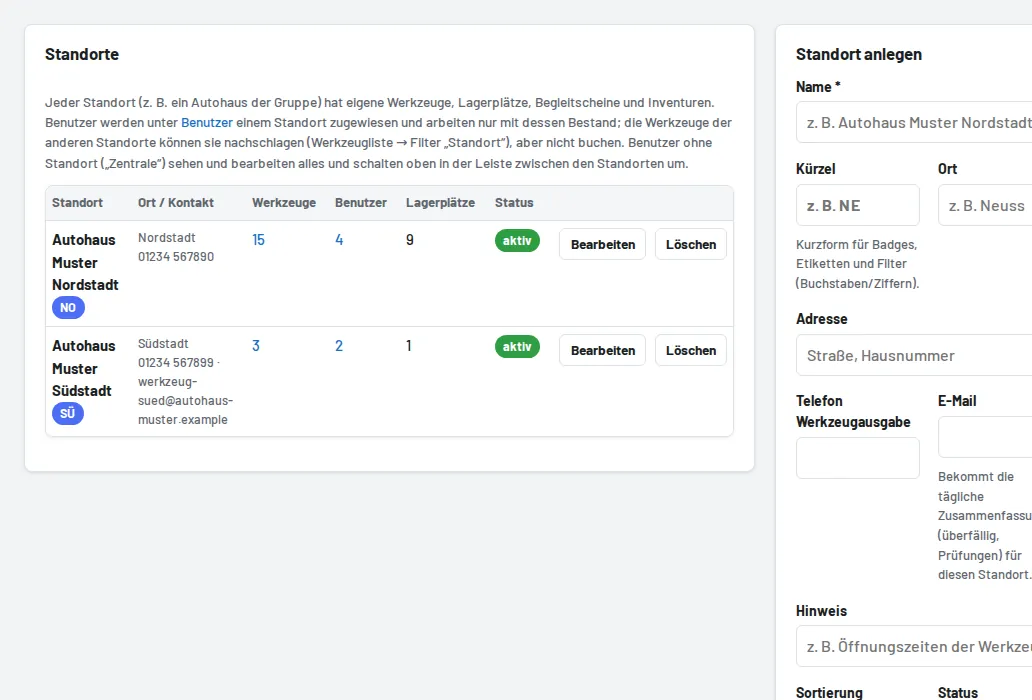
- Sites (head office administrator only): name, code (for badges, filters, calendar), town/address, phone and email of the tool issue, note (e.g. opening hours). A site can be deactivated; it can only be deleted when no tools, users or pick lists are assigned to it any more (storage locations and stocktakes are deleted with it).
- Every user belongs to exactly one site (field Site in the user form). Exception Head office – all sites: only for administrators and foremen; they see and edit all sites and choose the active site at the top of the header (or "All sites"). The active site applies to the overview, lists, reports, log and as the default for new entries.
- Tools, storage locations, pick lists, stocktakes and the recycle bin each belong to one site. Categories are shared. Inventory numbers stay unique across all sites (one label, one tool).
- Looking up other sites: the tool list has the Site filter ("My site", "All sites" or a single one). Tools of other sites show a grey site badge and no issue/return buttons; the tool page only shows availability ("3 of 5 pcs available", "on loan until …"), storage location, address and contact of the tool issue there. Anyone scanning another site's number (
/w/…) lands on this read-only page. - Bookings stay within the site: issuing, return, handing over, pick lists, reservations, damage, inspections, moving and stocktaking scans only work with tools of your own site and for employees of your own site (plus head office); everything else is rejected with a clear message. Foremen/admins of a site manage its users, storage locations and inventory.
- Requesting a tool from another site (since 2.16): on the other site's tool (list with the "All sites" filter or tool page) tap Request, enter the period (at most 60 days) and a note. The foremen and tool issue of the other site receive an email and see the request under Site requests → Inbox (number in the menu). Accept reserves the tool for the period (with a note if it overlaps another reservation), Issue now books the loan to the employee of the requesting site – the only loan across site boundaries, possible only through a request. Decline with a reason. The owning site books the return as usual when the tool comes back; the request then shows "returned". Requests can be cancelled until the tool is issued. The Site requests menu item only appears with several sites.
- Moving a tool to another site: head office → edit tool → choose site (only without an open loan or active reservation; the storage location must then be chosen again).
- Reminders: the central managers (settings, or admins/foremen without a site) receive the daily summary for all sites, grouped by site; foremen of a site and the site email only receive their site.
- Calendar subscription: entries carry the site code;
&standort=<code or ID>returns only one site. - API:
GET /api/standorte, filter?standort=and the fieldstandorton every tool/loan; an API key can be limited to one site. - CSV: export and import have a Site column (name or code); the storage location column is now called Storage location (old exports with "Standort = storage location" are still recognised). Since 1.9.1 also Parts for tool sets.