In Reports, the Shrinkage section shows what is missing, what it costs and who had it last – and where the next loss is looming. The figures apply to the selected period (top of the page, default: the last 90 days) and the active site.
Step 1: Read the key figures
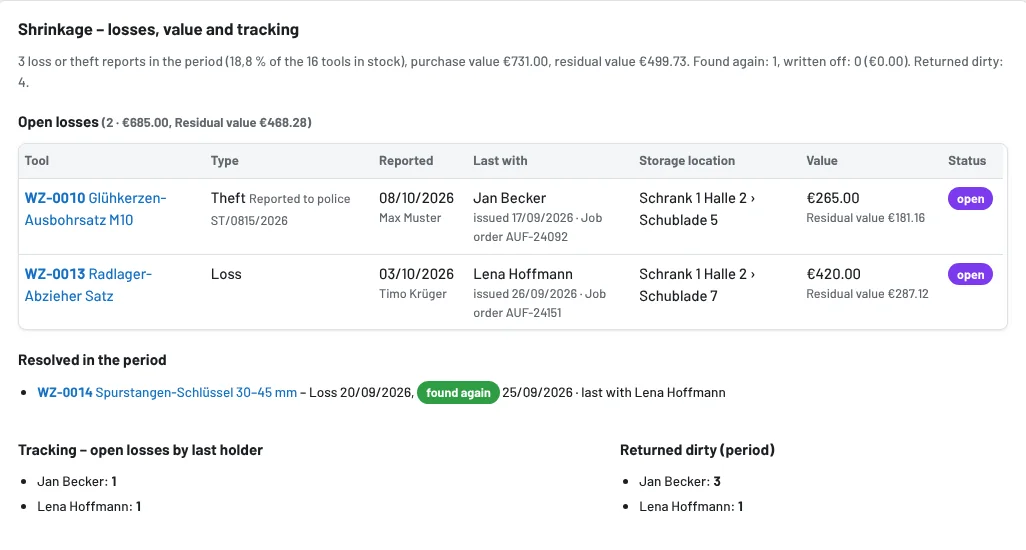
The first line sums up: number of loss and theft reports in the period, share of the stock, purchase and residual value, found again, written off, and how often tools were returned dirty.
Step 2: Track open losses
The Open losses table shows every tool reported lost or stolen that has neither been found nor written off – regardless of the period:
- Type – loss or theft, for theft with the police report number
- Reported – date and who reported it
- Last with – the employee who last had the tool on loan before the report, with date and job order
- Storage location, Value (purchase and residual value) and Status
Below: Resolved in the period (found again or written off), tracking – with which employees open losses last were – and who returned tools dirty.
Step 3: Risk – out for a long time
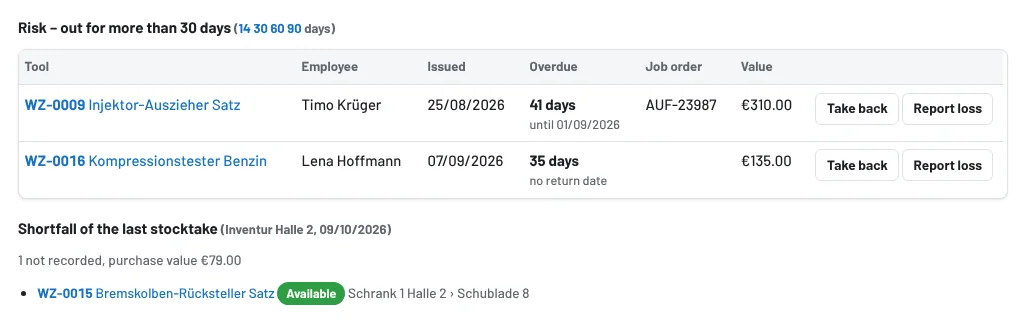
Risk lists loans that are overdue by more than 14, 30, 60 or 90 days or have been running that long without a return date – tomorrow's shrinkage. Choose the threshold with the numbers next to the heading. Straight from the list: Take back (the tool is back) or Report loss.
Shortfall of the last stocktake shows the tools that were not recorded in the last completed stocktake, with storage location and purchase value.
Keeping shrinkage small
- Record losses immediately under Damage → Report loss or theft – this closes open loans, sets the tool to Lost and creates a purchase suggestion.
- Keep overdue loans in view via the reminders and My day; go through the risk list once a week.
- Complete a stocktake per site regularly.
- Bring found tools back via the loss report with Found again – they then count as resolved.