The locking tool almost always needs its counterhold, the puller its matching adapter. Tulz remembers such pairs and suggests them when issuing – so the mechanic does not have to walk to the tool crib twice.
Two sources
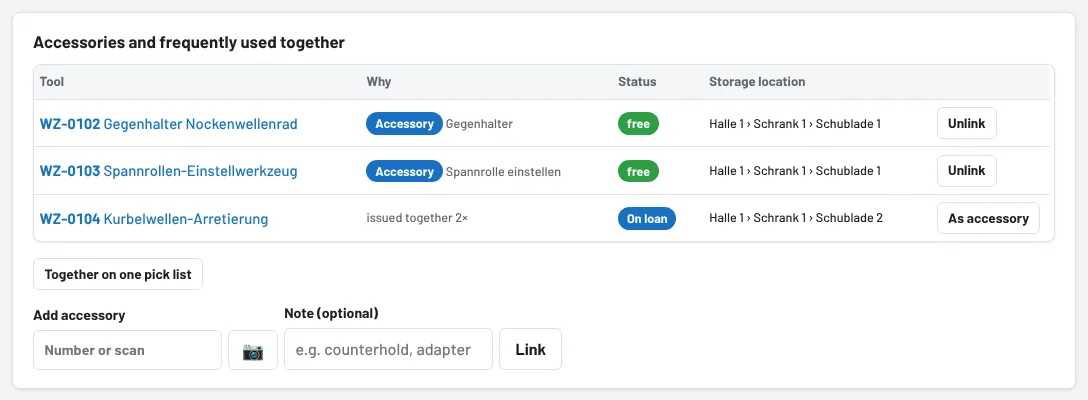
- Accessories you enter yourself: the tool crib, foremen and administrators open the tool page and, in the Accessories and frequently used together section under Add accessory, enter the number or scan the label, optionally with a Note ("counterhold", "adapter M14"). The link works in both directions.
- Often used together is detected by Tulz itself: tools that were issued together at least twice in the past year – on the same pick list or shortly after one another to the same employee. The Why column shows how often.
If a suggestion is right, As accessory turns it into a permanent link. Unlink removes a link again. Accessories only work within one site, with at most 30 links per tool.
When issuing
- Pick list: as soon as you tick or scan tools, Often used together – take these too? appears above the list – a tap on Tick adds the tool to the pick list. Anything currently on loan, defective or under inspection is only mentioned; for a later day, plan it with Plan for later.
- Issue tool: below the selected tool, Often used together: is shown with status and storage location. Issue everything together on a pick list takes the free tools along straight away.
- After issuing a single tool, the confirmation at the top mentions again what often goes with it – Issue too opens the issue form for the same employee.
Everything at once
On the tool page, Together on one pick list puts the tool together with all accessories and frequent companions into a pick list form.
Permanent units – a case with fixed contents, a fully equipped tool trolley – are better set up as a container (see Cases and tool trolleys).
As of