You don't have to type in a tool set with 40 parts. At the top of Create tool is Import tool set: Tulz uses it to pre-fill the form – name, manufacturer, article number, EAN, image and the parts. Nothing is saved until you have checked everything.
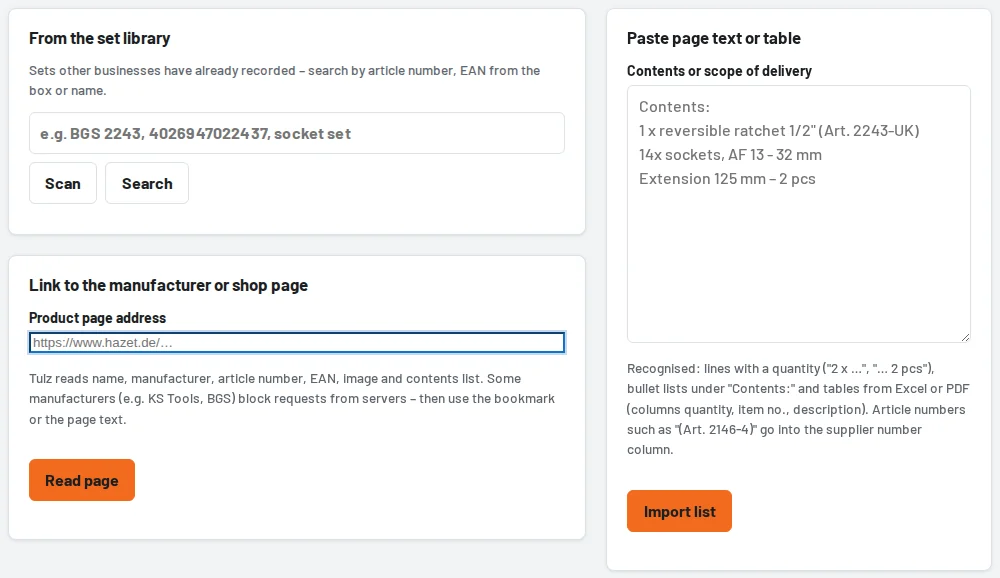
- Set library: enter the article number, name or the EAN from the box (scanner). You create checked sets with one click; they also appear in the tool search.
- Link: paste the address of the manufacturer's or shop page – Tulz reads the page.
- Paste text or table: copy and paste the "Contents" or "Scope of delivery" section of the page or an Excel or PDF table.
- Bookmark "Import into Tulz": for pages that block requests from servers (e.g. KS Tools, BGS). Drag the bookmark to the bookmarks bar once, then click it on the product page – your browser hands the page over.
Quantities ("14x socket inserts"), spanner sizes and profiles are recognised; a combined line such as "5x socket, AF 16 - 17 - 19 - 21 - 22 mm" is split into five parts. If the name says "46 pcs.", Tulz compares this with the sum of the parts. Download notes, properties and cross-reference numbers are left out. If the set is already in stock (same EAN or article number), a note with a link appears; a matching category is preselected.
When saving you can suggest the set for the set library – after our review other businesses can take it over too (only manufacturer data and parts list, nothing from your stock). For existing tools you paste a parts list under Edit → Parts; duplicate parts are skipped.