For some tools occupational safety requires a briefing – high-voltage adapters, lifting gear, welding equipment, pressurised brake fluid testers. Tulz records who was briefed when and by whom, both sign on screen, and if wanted Tulz issues the tool only to briefed employees.
Step 1: Set the briefing requirement on the tool
- Open the tool → Edit, section Loan rules & NFC.
- Tick Briefing required. Optionally enter Validity (months), e.g. 12 for the annual refresher; empty = unlimited.
- Save.
From now on Tulz refuses to issue the tool to employees without a valid briefing – in the issue form, at the kiosk, by scan, via pick lists and the API. The message names the tool and the reason.
Step 2: Record a briefing
- On the tool page in the Briefings section click Record briefing (workshop foreman, administrator).
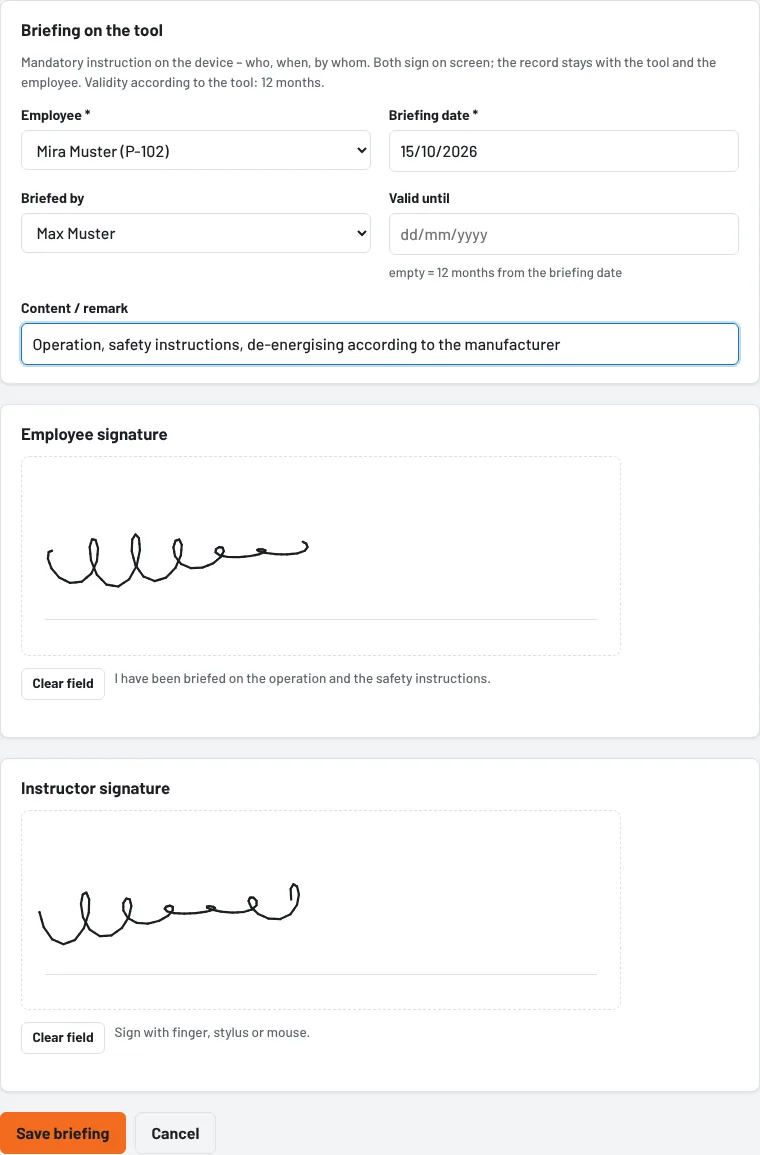
- Enter employee, date, briefed by (pre-set: you) and if needed valid until and the content ("operation, safety instructions, de-energising according to manufacturer's specification").
- The employee signs in the Employee signature field, the instructor below – with finger, pen or mouse. On a tablet this is most convenient.
- Save briefing.
The briefing appears on the tool (section Briefings) and with the user (Edit user → Briefings) with both signatures; the employee receives a notification. The tool's timeline shows "Briefing recorded".
A briefing can also be recorded without a requirement on the tool – as proof that it took place.
Validity and refresher
- Valid until empty and no validity on the tool: unlimited.
- If the tool has a validity in months, Tulz calculates the end from the briefing date; an entered "valid until" takes precedence.
- If a briefing expires within the next 30 days, it is listed in the daily reminder e-mail to workshop foremen (together with the certificates, switch under Settings → Reminders); afterwards Tulz blocks the issue again until a new briefing is recorded.
- Workshop foremen delete a wrong briefing on the tool (Delete in the row).
Privacy
The signatures are stored as images in Tulz's protected storage, not in the web directory, and are visible only when logged in and with the right. They are part of the employee's data access report; when a user is anonymised they are deleted, the proof of the briefing remains without a name. If a tool is deleted permanently, its briefings go with it.
As of