For a single repair the importer lends the special tool, the neighbouring workshop the engine support bridge or the tool rental service the hydraulic cylinder. So that it is issued, taken back and found like any own tool – and goes back on time – create it as a tool on loan from outside.
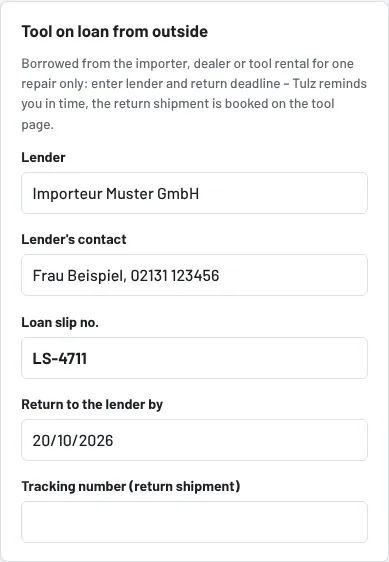
Step 1: Create the loan tool
- Tools → New tool (or edit an existing one).
- In the Tool on loan from outside section enter: Lender (e.g. "Importer Muster GmbH"), Contact (contact person, phone, e-mail), Loan slip no., Return by (the lender's deadline).
- Add name, storage location and if needed inspection interval as usual; Tulz assigns the inventory number.
- Save.
In the list and on the tool page the tool carries the note Loan tool – back by 31/10; when the deadline gets close (7 days) the note turns yellow, after expiry red.
Step 2: Everyday use
Issue, return, reservation, pick list, label – everything as with own tools. The dashboard shows in the Loan tools panel what has to go back in the next 14 days or is overdue, with lender and the employee who currently has it. The daily reminder to workshop foremen names loan tools whose deadline ends in the next days (can be switched off under Settings → Reminders), by bell or push.
Step 3: Return to the lender
- Take the tool back if it is still issued.
- On the tool page in the Loan tool section enter the tracking number (parcel service) and a remark and click Returned to lender.
Tulz sets the tool to retired, records return date, tracking number and loan slip in the history and cancels open reservations. The history remains: who had the tool when is still in loans and timeline. If the same tool comes again next time, create it anew – that way every loan stays traceable with its loan slip.
Tips
- Attach the lender's loan slip and delivery note to the tool as documents (section Documents).
- Report damage immediately as damage – with photo, as evidence towards the lender.
- Loan tools without a return deadline do not appear in the reminder – better enter the deadline generously and adjust it on extension.
- For tools that you lend to others, there is the Workshop network.
As of