Many employees at once – for example when starting out or for a new site – are created with a CSV file, e.g. from the staff list in Excel.
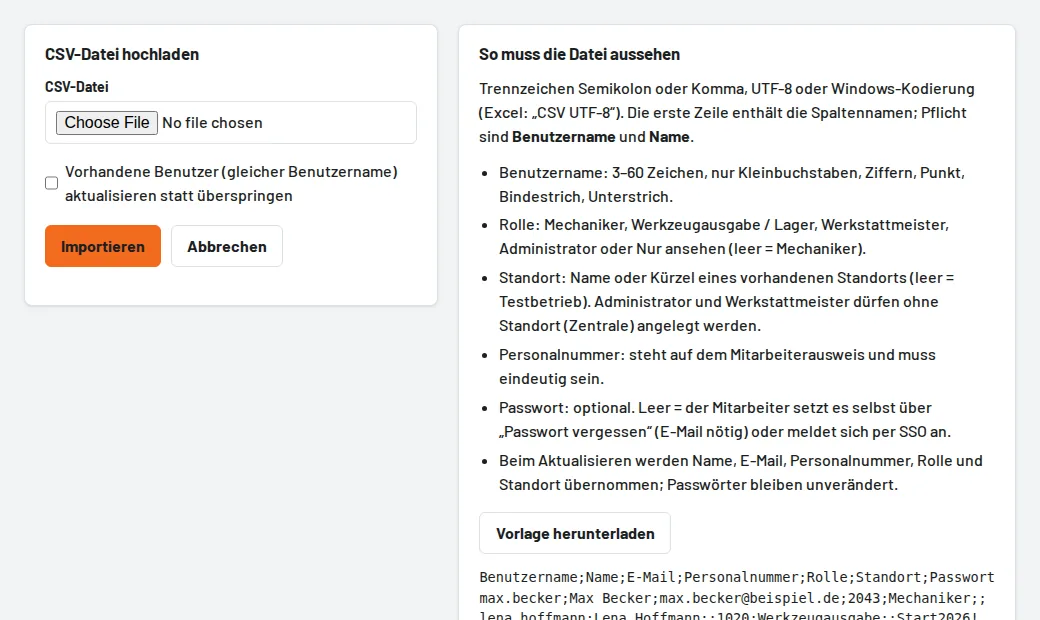
How it works
- Users → CSV import → Download template and fill in the columns: Username and Name are required; plus email, staff number (from the employee ID card), role (empty = mechanic), site (name or code) and an optional initial password.
- Save in Excel as "CSV UTF-8" (semicolon or comma are both fine).
- Upload the file and Import. Existing usernames are skipped – or updated with the tick (name, email, staff number, role, site; passwords stay).
Without a password the employee sets it themselves via Forgot password (this requires an email address) – or signs in with single sign-on using the company account. Faulty rows are reported with their row number, the others are created anyway. Your plan's user limit also applies to the import.