An employee is leaving the company – what do they still have, what has to come back, what is deleted? The leaver check shows everything on one page, takes back open tools with one click and deactivates the account only when nothing is open any more.
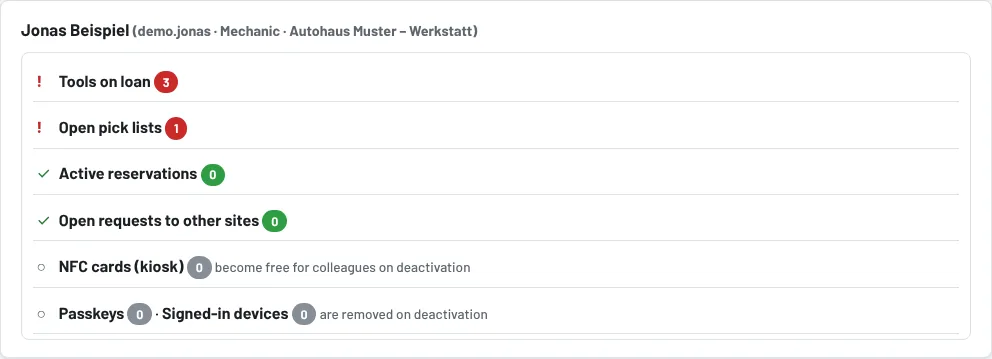
Step 1: Open the leaver check
Administration → Users → employee Edit → link Leaver check. Tulz opens the same page automatically when you want to deactivate or delete an account that still has something attached.
The checklist shows:
| Item | Meaning |
|---|---|
| Tools on loan | must come back – with tool, loan date and due date, Take back button per row |
| Open pick lists | planned or issued lists in their name |
| Active reservations, open requests to other sites | are cancelled |
| NFC cards, passkeys, signed-in devices | are removed on deactivation – the card then no longer works at the kiosk |
| Watches "Tell me when free" | are deleted |
| Qualifications and briefings | are kept as evidence (until anonymisation) |
| API keys | keys they created – check whether they are still needed |
| Reported open damage | stays, for information only |
Items marked red are still open. Deactivation is blocked by tools on loan and open pick lists; active reservations and requests are ended by Tulz on completion.
Step 2: Take everything back
If the employee still has something, click Take everything back and finish (optionally with a remark, e.g. "returned on the last working day, toolbox complete"). Tulz books all open loans as returned (condition "OK" – please report damage beforehand), closes pick lists, cancels reservations and requests and writes the action to the activity log. Take back individual tools with Take back in the row if you want to record the condition per tool.
Step 3: Deactivate the account
When nothing is open any more, Deactivate becomes active. Tulz removes NFC cards, passkeys, signed-in devices, watches and push subscriptions; the history (who had what when) remains complete. Delete permanently additionally anonymises the personal data – only when your company's retention period has been reached (see Data access report and retention period).
Good to know
- The Active switch in the user form and Delete in the list also check the blockers and lead to the leaver check.
- For a site change within the company the return is enough – the account stays active.
- The data access report (Users → Data access report) lists everything stored about the person before they leave.
As of