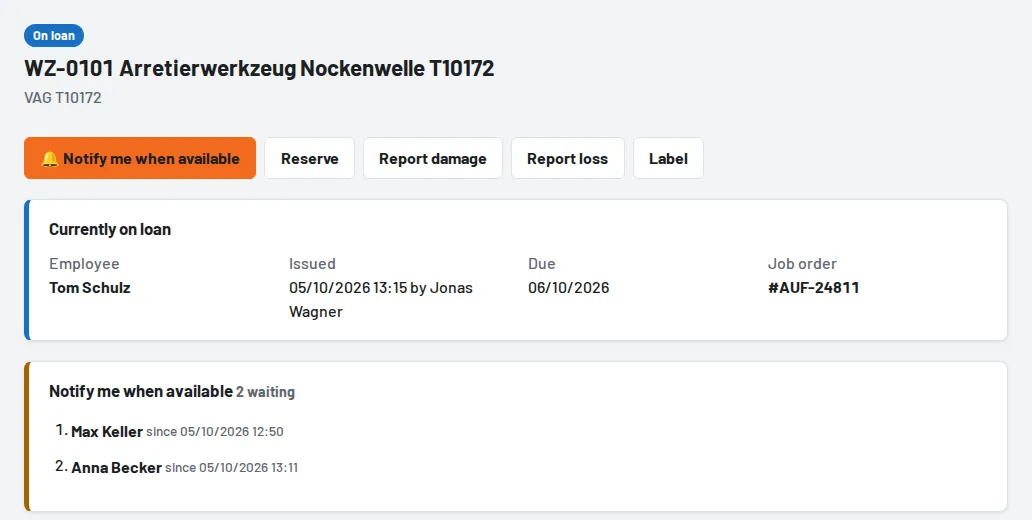
If a tool is currently on loan, defective, incomplete or being inspected, you don't have to keep checking. Tap 🔔 Notify me when available on the tool page – as soon as the tool has been returned or is ready for use again, you get a notification.
How it works
- Search for the tool or scan its label and open the tool page.
- Tap Notify me when available. Waiting appears at the top, below it your position on the waiting list.
- When the tool is available, the notification Watched tool is available arrives – with the storage location, the number of free pieces for bulk items and a note if it is reserved for someone else today. Tapping it opens the tool page.
The button is also in the issue form when the selected tool is not available, and on tools at other sites – you can then request it as soon as it is free.
When several people are waiting
Everyone on the waiting list gets the notification at the same time; the list shows who asked first. Tool issue sees the order after the return (Notified (waiting list): …) and in the issue form – so the tool goes straight to the right person.
- Once you get the tool – by issue, pick list or hand-over – your entry is done.
- If a colleague was quicker, your entry stays and you are notified again next time.
- If you don't collect the tool, your entry ends by itself 24 hours after the notification.
Adding colleagues
Tool issue, foremen and administrators can also add colleagues in the Notify me when available section of the tool page – for example when someone asks at the counter – and remove entries.
Overview and settings

- Loans → My day shows all your entries; tools that have become available are at the top with storage location and Borrow now. Leave waiting list or Done takes you off the list.
- How the notification arrives – bell and push, bell only or not at all – is set under Notifications for "Watched tool is available". It reaches your phone when push is enabled (see Enable push notifications on your phone).
- Employees with read-only access cannot use the waiting list; retired and lost tools cannot be watched either.