Switching from Toolorg, Stepptools or a well-kept Excel list to Tulz? The migration assistant reads your file as it is, recognises the columns by their headings and creates the tools – including categories, storage locations, numbers and inspection dates. You do not need the Tulz template for this.
Step 1: Export the list
- Toolorg, Stepptools and other programs: export the tool list as an Excel or CSV file – usually via the export function of the list. Export all columns if possible; whatever is not needed you simply leave out in the next step.
- Own list: save as .xlsx or CSV in Excel or LibreOffice. The first filled row is the column headings; headings such as "inventory number", "name", "manufacturer", "storage location", "OEM number", "inspection interval", "last inspection" are recognised by Tulz in German, English, Italian and abbreviated spellings.
Up to 20 MB and 5,000 rows per file; split larger lists. With Excel the first worksheet counts.
Step 2: Read the file and check the columns
- Tools → More → Migration assistant (or from the CSV import).
- Choose the origin, select the file, Read file.
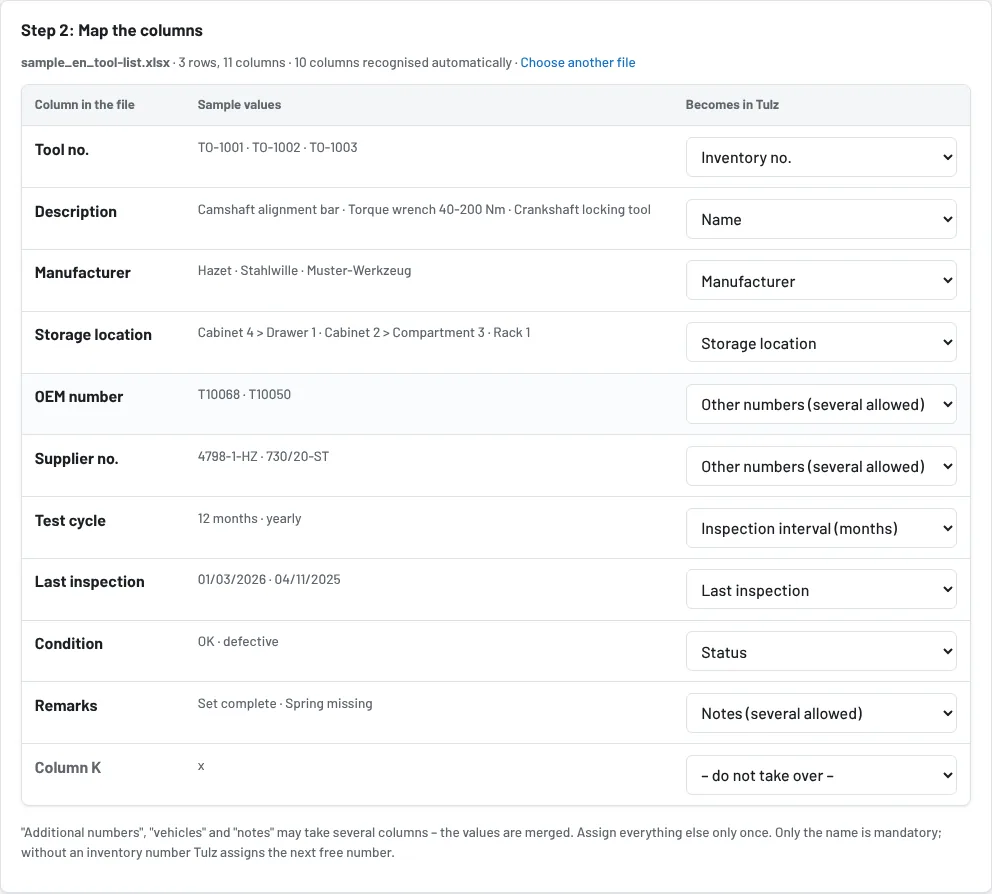
- The mapping table shows sample values for each column and where it goes in Tulz. Change what does not fit in the selection; – do not take over – leaves a column out. Only the name is mandatory.
- Additional numbers, vehicles and notes may take several columns – an OEM column and a supplier column both end up as numbers on the tool, with their origin. All other targets only once.
- The preview below shows the first rows of the file with the mapping.
Step 3: Take over
At the bottom tick Update existing tools if inventory numbers from the file already exist in Tulz and are to be overwritten – otherwise they stay unchanged. Skip rows without inventory number prevents Tulz from assigning new numbers for them. With several sites you choose the site for rows without a site. Then Take over rows now.
What Tulz converts
| In the file | Becomes |
|---|---|
| Condition "OK", "defective", "repair", "retired", "lost", "at the calibration lab" | status available, defective, retired, lost, in inspection (tools on loan arrive as available) |
| Dates "01.03.2026", "1.3.26", "2026-03-01", "03/2026", Excel date numbers | date |
| Interval "12", "12 months", "yearly", "half-yearly", "2 years" | months |
| Price "1.199,00 €", "1,234.56", "189.9" | amount |
| Storage location "Cabinet 2 > Drawer 3" or "Hall 1 / Rack 4" | storage location as a path (levels with >, › or /), created if new |
| Category, group, product group | category, created if new |
Not taken over are loan history, pictures and users of the old program. Tools that are currently issued there arrive as available and are issued anew in Tulz – fastest by scan.
After the takeover
- Tulz shows tools without a storage location straight away; assign via Move (scan the storage location, then the tools).
- Print labels, write NFC tags, go through the inspection review under Inspections → Review open.
- The file stays in the cache for one hour only and is deleted after the takeover. A backup under Settings → Backup beforehand is worthwhile – then a takeover can be rolled back.
As of