The manufacturer's auditor, the accident insurer or your own quality officer wants to see that all tools subject to inspection have been inspected – with reports and certificates. Instead of printing pages one by one, Tulz creates the complete audit folder as a ZIP with one click.
What is inside
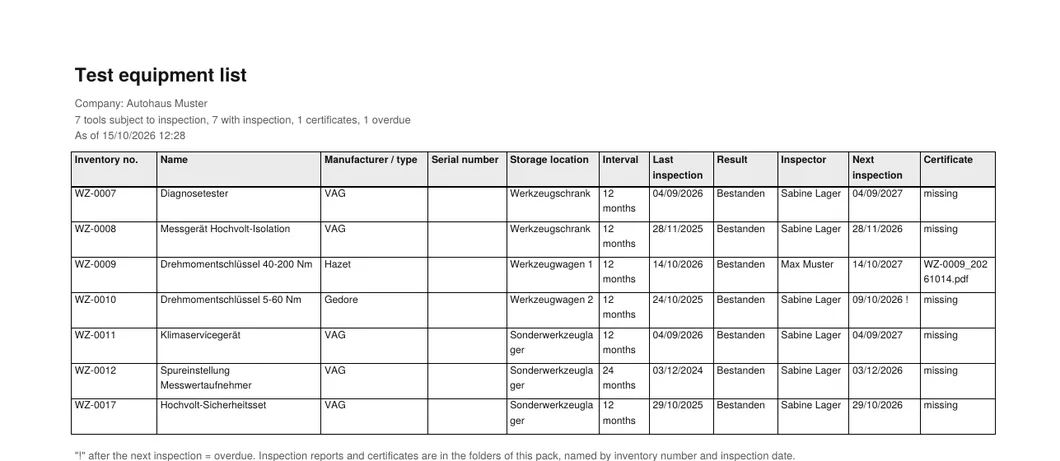
- Pruefmittelliste.pdf – all tools subject to inspection at the site (landscape, with inventory number, name, manufacturer/type, serial number, category, storage location, inspection interval, last and next inspection, result, inspector) and a summary: how many inspected, overdue, never inspected
- Pruefmittelliste.csv – the same list for Excel
- Pruefprotokolle/ – for each tool the report of the last completed inspection as PDF (
<number>_<date>.pdf), with measured values from the inspection template, result and remark - Zertifikate/ – uploaded calibration certificates, where available
- LIESMICH.txt – company, site, creation date, who created the folder and which tools still have no inspection
Retired tools are left out; postponed inspections do not count as completed.
Creating the folder
- Open Inspections. The active site at the top determines which tools are included (head office: all sites).
- Optionally enter a number or a term in the search field – then the folder contains only matching tools (e.g. only torque wrenches).
- Click Audit folder. Tulz builds the folder and downloads it (
Audit-Mappe-<date>.zip). With many tools this takes a few seconds.
The button is visible to employees with the right Manage inspections (workshop foreman, administrator). Every download is recorded in the activity log.
Before the audit
- Upload certificates from the calibration lab with the inspection (or have them entered via the Lab access) – then they are in the folder.
- If the report is missing for older inspections, it is generated from the saved data; measured values exist only if an inspection template was used.
- The folder is a snapshot. For the archive, file the ZIP under the audit date.
As of