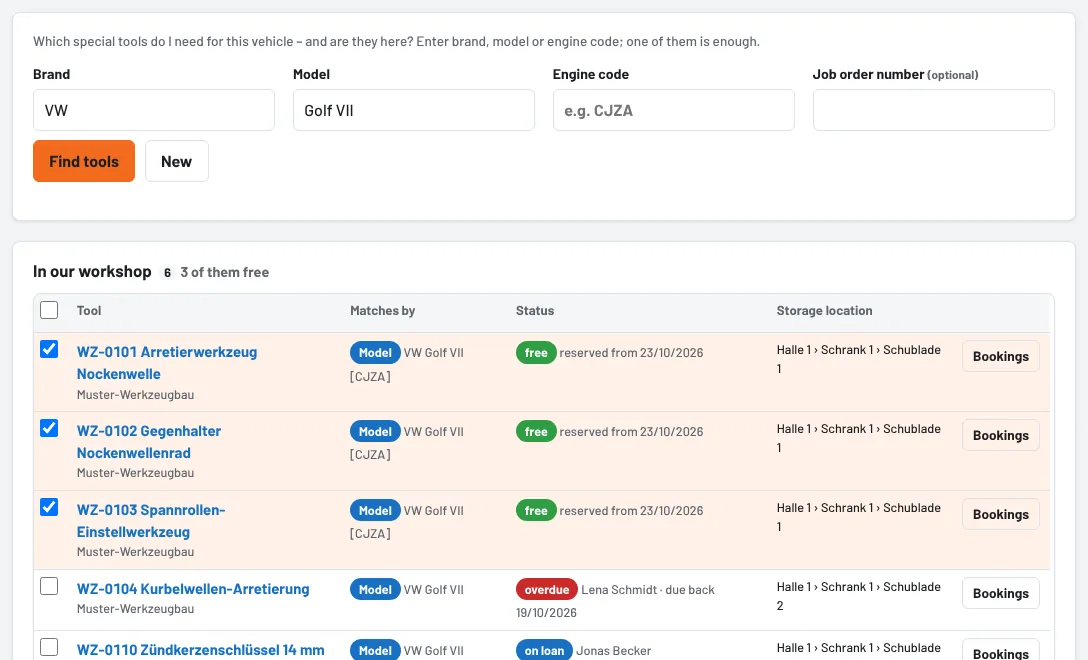
A job comes in – which special tools do I need for this vehicle, and are they here? Under Loans → By vehicle you enter brand, model or engine code; Tulz lists all matching tools with status and storage location and puts them on a pick list with one tap.
Prerequisite: vehicles on the tool
The search uses the vehicles entered on the tool (Edit tool → Matching vehicles: brand, model, engine code). The more complete these details, the better the list fits.
Searching
- Open Loans → By vehicle.
- Enter Brand, Model and/or Engine code – one of them is enough. The fields suggest what exists in your inventory.
- Find tools.
Tulz is generous here: "VW" also finds "Volkswagen", "Golf 7" also finds "Golf VII"; upper and lower case, spaces and hyphens make no difference. Tools that only match the brand (no model) appear further down. The Matches by column shows whether a tool was found via engine code, model or brand.
Results
- In our workshop: the matching tools at your site with status, storage location and – for tools on loan – with whom and until when. The heading shows how many of them are free.
- At other sites: Requests lets you request the tool from there (see Request a tool from another site).
- In the workshop network: partner workshops that have shared matching tools you do not have yourself.
- Matching job templates: templates for this vehicle – Pick list from template uses them directly.
Onto a pick list
The free tools are already ticked. Enter the job order number and click Ticked tools on one pick list – the pick list form opens with all tools, the job order number and the vehicle as a note. Choose the employee, issue, done.
Is the vehicle only coming in one of the next days? Choose Issue on and Plan for this day: Tulz reserves the tools until they are issued – even those still on loan today (see Plan a pick list for later).
Tool missing?
If Tulz finds nothing or something important is missing, Request a purchase takes you straight to a purchase request – with vehicle and job order already filled in.
As of