The calibration shipment is on its way, and when the torque wrenches come back someone types results, inspection dates and next due dates from the pile of paper. With lab access the lab does that itself: it gets a link without login, enters result, inspection date, next inspection, remark and certificate per tool – and when you record the return everything is already filled in in Tulz.
Step 1: Create the link
- Open Inspections → Calibration shipment and click the shipment.
- In the Lab access section click Create link. Tulz asks for your password once.
- The link is shown once – copy it and send it to the lab (delivery note, e-mail). If the supplier has an e-mail address and mail sending is set up, Send by e-mail sends the link directly.
The link is valid for 90 days and only for this shipment. Whoever has it sees only the tools of the shipment with number, name, manufacturer and serial number – no other company data, no prices, no employees.
Step 2: The lab enters
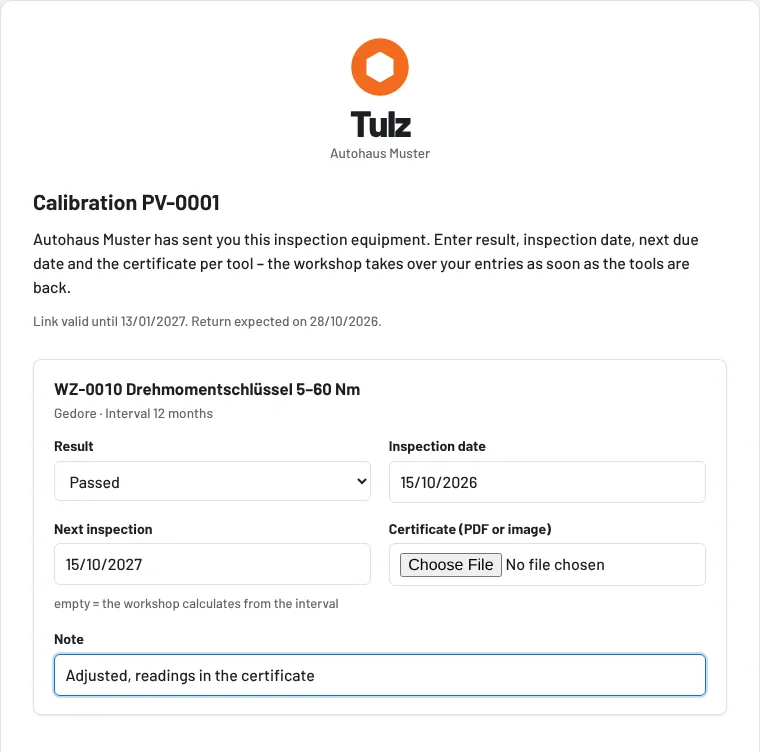
The lab opens the link and sees for each tool:
- Result – passed, passed with conditions, failed
- Inspection date (not in the future) and Next inspection
- Certificate – upload PDF or image (up to the size of inspection attachments)
- Remark
With Save entries the data is in Tulz. The lab can open the page several times and enter tools one after the other. Nothing is booked by this – the tool stays "in inspection" until the workshop records the return.
As soon as the lab has entered something, workshop foremen get a notification "Lab has entered results". The shipment shows when the link was last opened.
Step 3: Record the return
When recording the return, result, inspection date, next inspection and remark are pre-filled from the lab's entries, and the uploaded certificate is attached to the inspection automatically. You check, change if needed and book – only now the inspection and the new status are created. What the lab entered stays visible until then.
Withdrawing the link
Withdraw access on the shipment makes the link invalid immediately – for example if it went to the wrong address. Create new link creates a new one at any time; the old one then no longer applies. Once the shipment is completely booked back, the link only leads to a notice page.
Security
The link contains a random key that Tulz stores only as a checksum; calls are limited per address. No login, no access to other pages. Certificates are checked like inspection attachments (file type and size).
As of