By the afternoon you know which vehicles are coming in tomorrow. Instead of checking job by job which special tools are needed, paste the whole appointment list under Loans → Plan appointments: Tulz finds the matching tools for each vehicle, shows whether they are free on the appointment day and reserves them as a planned pick list with one click.
Step 1: Paste the list
Copy the appointment list from your workshop software or from Excel and paste it into Paste list – or upload it as a CSV file. The header row matters: Tulz uses the column names to work out what is where.
- A vehicle column is required: Vehicle (e.g. “VW Golf VII 2.0 TDI CJZA”) or Make, Model and Engine code separately.
- Also used: Date, Time, Job order, Registration, Work and Mechanic. Which columns does Tulz recognise? lists the column names, including German and Italian ones.
- Separator semicolon, comma or tab; at most 100 appointments at once.
- If the list has no date, the appointment day from the form applies – the next working day is suggested.
If Tulz has recognised a column wrongly, correct it under Assign columns.
Step 2: Check the suggestions
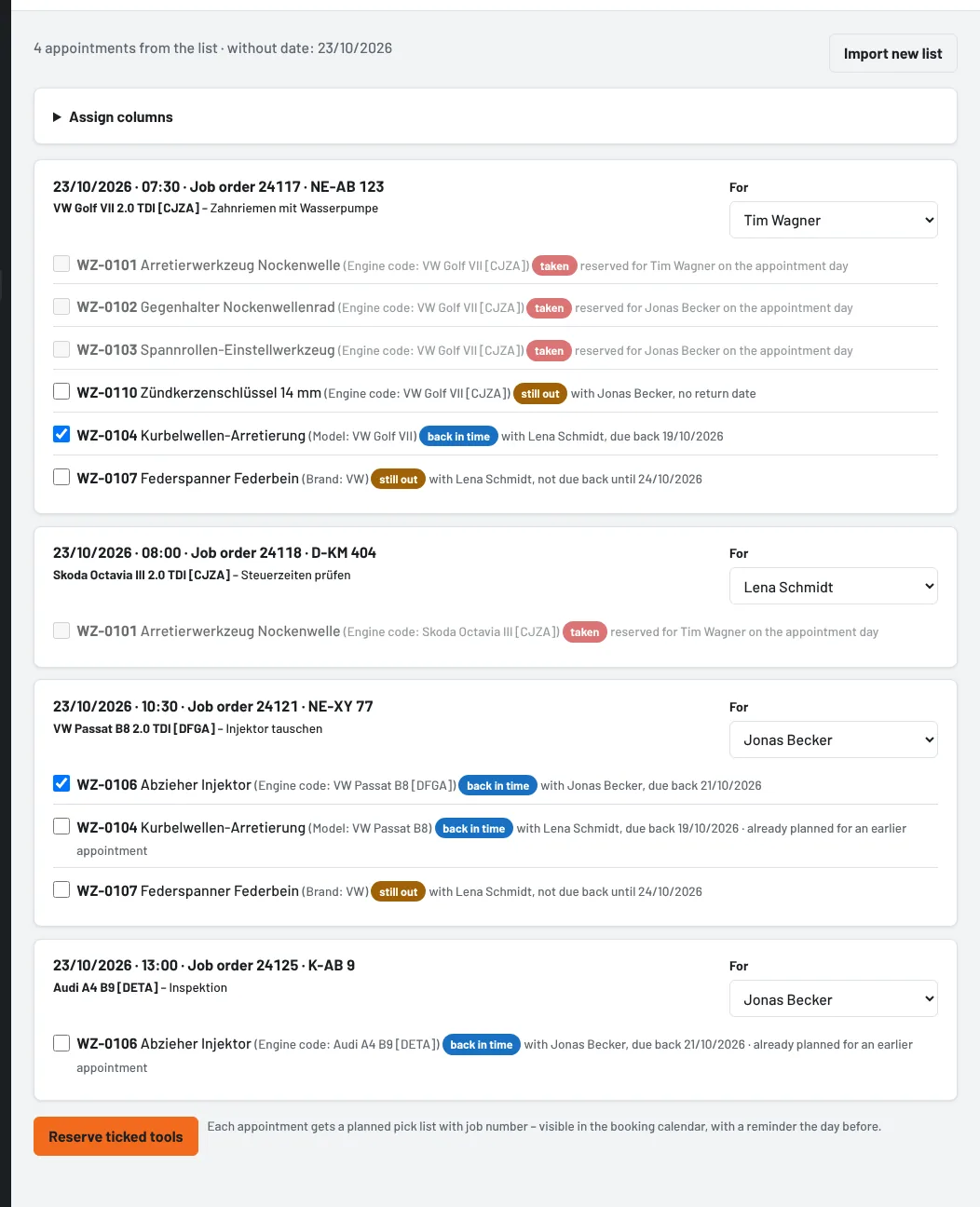
Each appointment shows date, time, job order, registration, vehicle and work – and below it the matching special tools, found via the vehicles stored on each tool (see Job by vehicle). The brackets show whether a tool matches by engine code, model or only the make. The status on the appointment day:
- free – in stock
- back in time – still on loan, due back before the appointment
- still out – due back only afterwards or without a date
- taken – already reserved for someone else on the appointment day, cannot be selected
Tools that match at least by model and are free or back in time are preselected. If an earlier appointment on the same day already needs the only unit, it is not ticked for the later one – “already planned for an earlier appointment”. Tick or untick as needed.
The mechanic is taken from the list if the name, personnel number or surname matches uniquely; otherwise you choose them.
Step 3: Reserve
Reserve ticked tools creates a planned pick list for each appointment – with job number, time, registration and vehicle as a note. The tools are reserved for the appointment day and visible in the booking calendar. From then on everything works as in Plan a pick list for later: the day before, Tulz reports whether everything is ready, and on the day the tool crib issues everything with Issue now.
Reserved appointments are marked green and link to their pick list. If a tool is already taken or the mechanic is missing, Tulz names the appointment and the reason; the others are reserved anyway. Import new list discards the list.
Appointments straight from the workshop software
Instead of copying the list, the workshop software can send its appointments itself – optional and switched off until an administrator switches it on: under Settings → Job orders and appointments tick Accept appointments from the workshop software via the API and under Settings → API create a key with “read and book” for the workshop software. It sends each appointment to POST /api/termine – with datum, uhrzeit, auftrag, kennzeichen, fahrzeug (or marke, modell, motorcode), arbeit, mechaniker and ideally its own appointment id. The API itself is enabled by the platform operator.
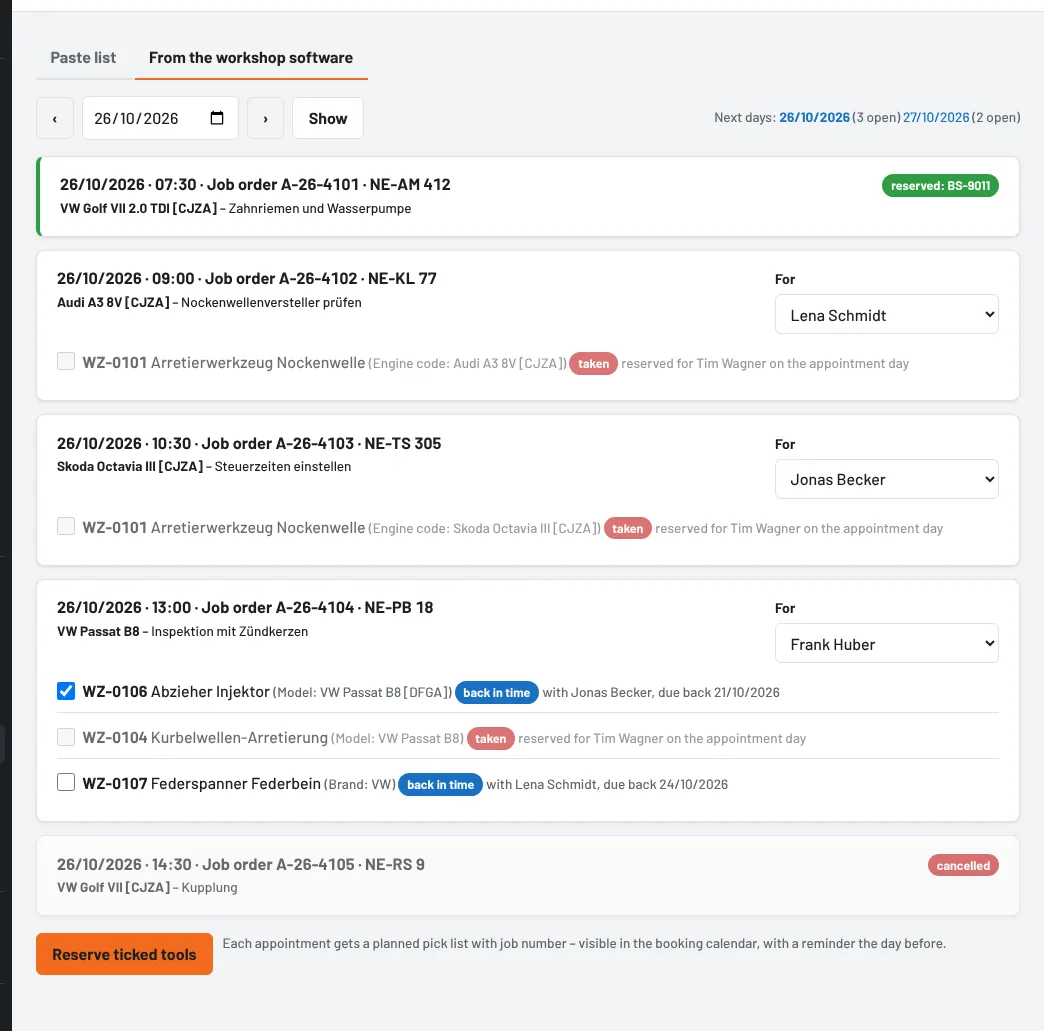
The appointments appear under Plan appointments → From the workshop software, day by day, with the same suggestions as the pasted list; Next days shows where appointments are still open. Reserving works as above.
- Reserve right away: with Reserve appointments right away when they arrive, Tulz reserves the preselected tools as soon as the appointment arrives and the mechanic is known. If a tool is taken, Tulz tries again the next time the appointment is sent.
- Moved or changed: if the workshop software sends a new date, a different vehicle or a different mechanic, the old pick list is dropped, the tools become free and the appointment is planned again; the mechanic is notified. If only the time, registration or work changes, the note on the pick list is updated.
- Cancelled (
POST /api/termine/absagen): the pick list is deleted and the tools are free again. If tools have already been issued, it remains. - Tulz recognises the mechanic by user name, personnel number, name or unique surname. If you choose a different one in Tulz, it stays as long as the workshop software does not send a new one.
Appointments from the workshop software are deleted 30 days after the appointment.
Who can plan appointments
Everyone with the right Issue and return for all employees – tool crib, foremen and administrators.
As of