A bit is rounded off, the counterhold does not fit the new Golf, an adapter is missing from the case – small things like these easily get lost in everyday work. With feedback, mechanics let the tool crib know in two taps; the tool crib sees everything in one place and replies.
Giving feedback
- When returning a tool: in the return form, open Feedback to the tool crib and tick what you noticed.
- At any time on the tool page: More → Give feedback, or on the History tab under Feedback.
You can choose Blunt or worn, Does not fit a vehicle, Part or adapter missing, Instructions missing or unclear, Very good – definitely keep it and Other – several at once is fine. For “does not fit”, enter the vehicle (e.g. “Golf 8 2.0 TDI DTTA”) and add a few words under What exactly?. The tool remains available for loan. If it is so damaged that it can no longer be used, that belongs in a damage report (condition “Defective” on return).
The tool crib and the foreman of the site are notified. Pure praise is marked as done straight away and is shown on the tool – useful to know when deciding whether to buy more or retire a tool.
Handling feedback
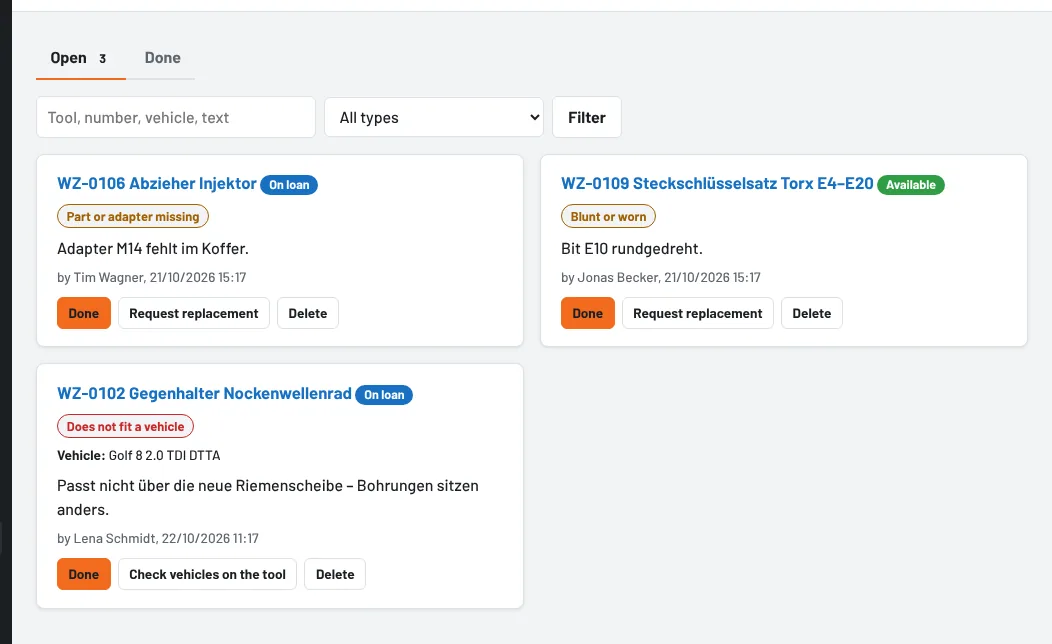
Under Tools → Feedback the open feedback is shown as cards, oldest first; the counter in the menu shows how many are open. Search and the filter by type help when there are many entries.
- Done – optionally with a reply to the employee, e.g. “New bits are on order, adapter is in compartment 3”. The employee receives the reply as a notification.
- Check vehicles on the tool (for “does not fit”) opens the tool directly at Matching vehicles – so that By vehicle and Plan appointments only suggest tools that really fit.
- Request replacement (for “worn” or “part missing”) creates a purchase request.
- Reopen brings back feedback that was marked as done, Delete removes it.
The tool page (History tab) shows the latest feedback with replies – so everyone can see what has already been reported.
Who can do what
Everyone who borrows tools can give feedback. Under Feedback, mechanics only see their own entries and can delete them while they are open. Everyone with the right Create and edit tools – tool crib, foremen and administrators – can handle feedback. An employee's data report includes their feedback.
As of