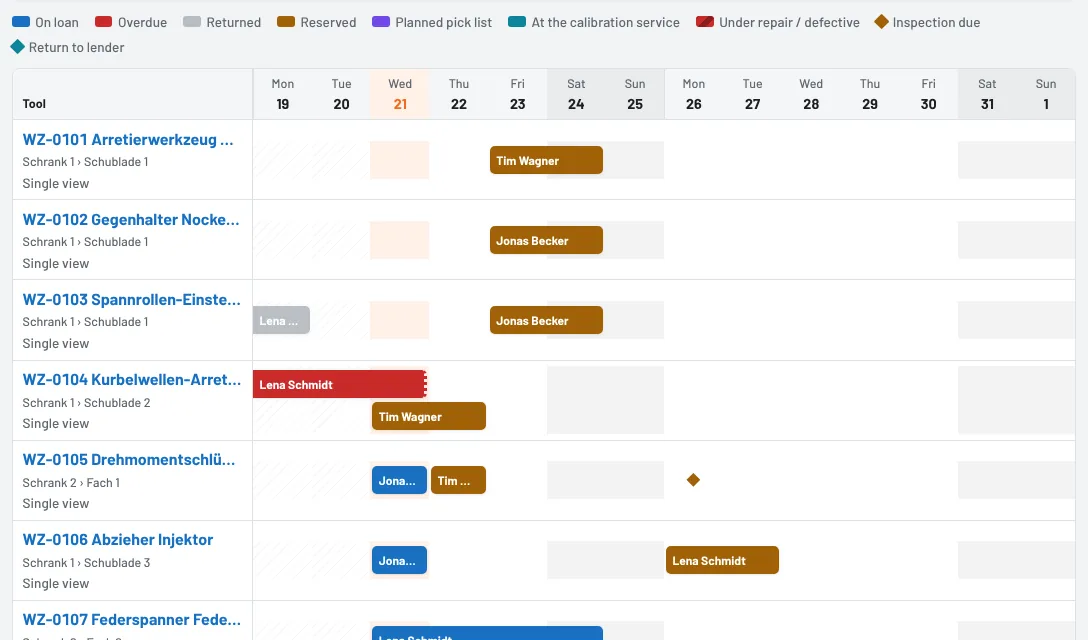
The booking calendar shows for the coming weeks when each tool is on loan, reserved, on a planned pick list, at the calibration service or under repair – one row per tool, one column per day. You can see at a glance whether the locking tool is free on Thursday and reserve it with one tap.
Opening it
- Tools → Booking calendar shows all tools at your site.
- On the tool page, Bookings opens the calendar for that tool only – with four weeks and the list Bookings in this period below.
Reading it
Each bar is a booking; the Legend above the calendar explains the colours:
- On loan and Overdue – with employee and due date. Loans without a due date end on today's date with an open end. Returned shows who had the tool in the past few days.
- Reserved and Planned pick list – for whom and until when.
- At the calibration service and Under repair / defective – as long as the tool cannot be borrowed.
- Markers on a single day: Inspection due and Return to lender (tools on loan from outside).
- Tools in a personal kit (see Personal tool kit) appear as a loan across the whole period; the tooltip on the bar says so.
Hovering over a bar shows the details – employee, period, pick list, job order; a tap opens the pick list, the reservations, the calibration shipment or the damage report. Today is highlighted and weekends are grey. For bulk items the quantity is shown in the bar. Single view next to a tool opens its calendar on its own.
Filtering and scrolling
- Search by inventory number, name or vehicle, plus Category and Storage location.
- Period: 1, 2 or 4 weeks. Scroll with Earlier, Today and Later.
- Booked only hides tools without any booking in the period – handy for large inventories.
On a phone you can swipe the calendar sideways; the tool column stays in place.
Reserving from the calendar
Tap a free day in a tool's row. The reservation form opens with the tool and that day as start and end; adjust the period and employee if needed. After saving you return to the calendar. In a tool's single view there is also a Reserve button.
Shortages at a glance
Above the calendar is the Shortage forecast: days on which a tool is double-booked or all units are taken. See Shortage forecast: spot double-booked tools in time.
As of