When a tool keeps going missing – the mechanic borrows it from the workshop next door every time or improvises – the foreman rarely hears about it. With purchase requests, every employee reports a missing tool in a minute, colleagues add their support, and the foreman or tool crib decides with the actual demand in view.
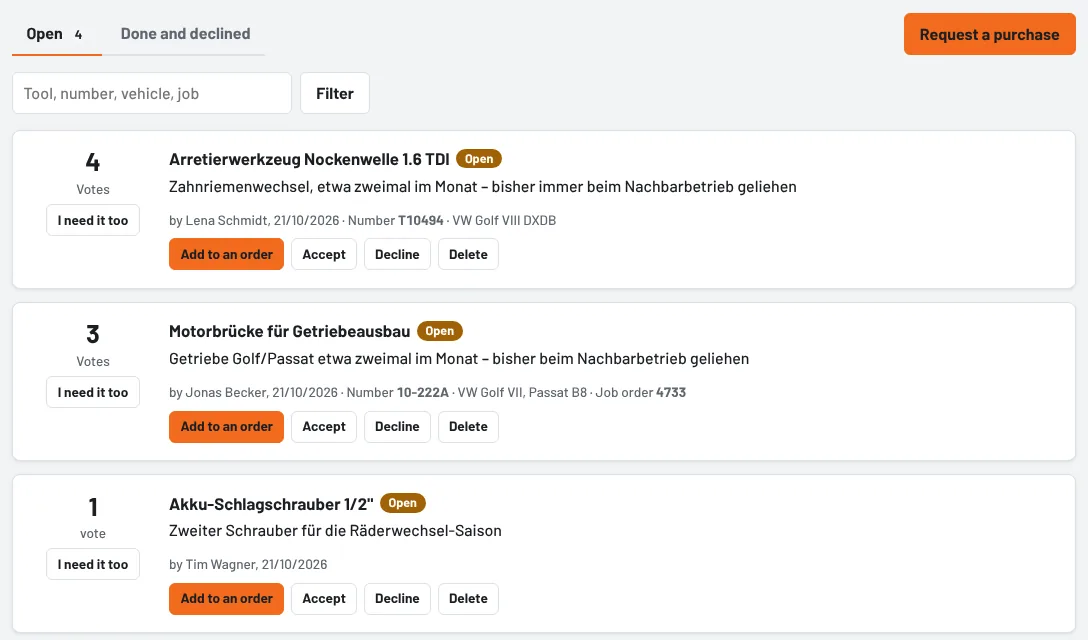
Submitting a request
- Tools → Requests → Request a purchase – or straight from the tool search when it finds nothing (Request "…" as a purchase), or under By vehicle.
- What is missing? – as precisely as possible, e.g. "camshaft locking tool 1.6 TDI".
- What for, how often? – this is what convinces: "timing belt replacement, about twice a month – always borrowed so far".
- If known: OEM, manufacturer or supplier number, vehicle or engine code, the job where it was missing, and a link to the shop.
- Submit request.
If a similar request already exists (same number or similar name), Tulz shows it first – better to support that one. If it is something different after all, click Submit request again.
Foremen and the tool crib get the notification New purchase request and see the number of undecided requests next to Requests in the menu.
Supporting a request
If a colleague needs the same thing, they press I need it too. The list is sorted by votes – what many people need is at the top. A second tap withdraws the vote. Whoever submitted the request automatically counts as the first vote.
Deciding (foremen, tool crib, administrators)
- Accept: the request is set to Accepted – for example while quotes are still being obtained.
- Add to an order (also without accepting first) opens a new purchase order with the name, number and link as an item. After saving, the request is set to Ordered.
- Decline: with a short reason that everyone can see – for example "we borrow it from our partner, needed too rarely".
- Reopen brings back a declined request.
What happens next
When goods receipt is booked for the purchase order, the request is set to Done. If the order is cancelled or deleted, it goes back to Accepted. With every decision, when it is ordered and when the tool arrives, the person who submitted it and everyone who supported it get a notification – so nobody has to go looking for a tool that has arrived.
You can delete your own requests while they are still open; foremen and the tool crib can delete any. Done and declined requests are listed under Done and declined.
As of